A fast-draining iPhone battery can be frustrating, especially when you rely on your device for work, communication, navigation, or entertainment. If your battery seems to lose charge much faster than it used to, you may wonder whether it’s a software issue, a hardware problem, or simply a sign of an aging battery.
At Erepair N Spares, we can help customers experiencing battery-draining-related problems. In many cases, simple adjustments can improve battery life, if other situations require professional diagnosis or battery replacement. This guide explains the most common reasons your iPhone battery drains quickly and the practical steps you can take before considering a repair.
Whether you’re searching for Apple iPhone repair in Papakura or want to extend your battery life, these tips can help you make the most of your device.
Understanding Why iPhone Batteries Drain Faster Over Time
All iPhone use a rechargeable lithium-ion battery. Batteries are designed to provide reliable performance, but they naturally lose capacity after repeated charging cycles. It stores less power, meaning your phone may need charging more often than it did when it was new.
Battery life can be affected by software settings, heavy app usage, background processes, environmental conditions, and hardware issues.
Common Causes of Fast iPhone Battery Drain
1. High Screen Brightness
The screen is one of the biggest factors affecting your iphone’s battery. Keeping brightness at maximum throughout the day can significantly reduce battery life.
- Enable Auto-Brightness.
- Reduce screen brightness manually when indoors.
- Turn on Dark Mode if your iPhone supports an OLED display.
2. Background App Refresh
Many applications continue refreshing content even when you’re not actively using them. Social media, weather, news, and messaging apps frequently refresh in the background, using battery power.
Easy Fix:
Go to: Settings → General → Background App Refresh
Only keep it enabled for apps that need regular updates.
3. Location Services Running Constantly
GPS is another major battery consumer. Some apps continue tracking your location even after you’ve finished using them.
Easy Fix:
Navigate to: Settings → Privacy & Security → Location Services
Choose While Using the App whenever possible instead of Always.
4. Outdated iOS Version
Software updates often include battery performance improvements, bug fixes, and better power management.
Easy Fix: Install the latest compatible version of iOS through:
Settings → General → Software Update
5. Battery Health Has Declined
Over time, every lithium-ion battery loses its maximum capacity. Once battery health drops significantly, you’ll notice shorter battery life between charges.
Check your battery health:
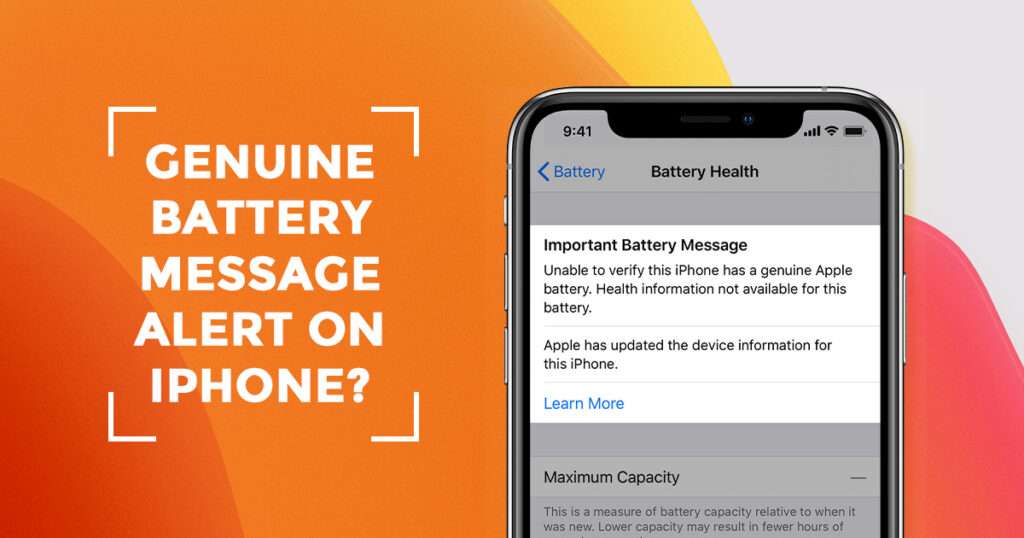
Settings → Battery → Battery Health & Charging
If Maximum Capacity is below approximately 80%, it may be time to consider replacing the battery.
6. Too Many Push Notifications
Every notification wakes your display and activates background processes.
Easy Fix-
Disable unnecessary notifications by visiting:
Settings → Notifications
Only allow notifications from apps you genuinely need.
7. Poor Mobile Signal
If you’re in a poor or unstable signal, your iPhone works harder to maintain a connection, increasing battery usage.
Easy Fix:
- Connect to Wi-Fi whenever available.
- Enable Airplane Mode when you don’t need network access in weak coverage areas.
8. Battery-Hungry Applications
Gaming apps, video streaming services, GPS navigation, and video calling applications place heavy demands on the processor and battery.
Easy Fix-
Check battery usage:
Settings → Battery
Identify apps consuming excessive power and limit their usage when necessary.
Simple Ways to Improve iPhone Battery Life
Not every battery issue requires a repair to solve battery problems. These habits can make a noticeable difference.
Enable Low Power Mode
When your battery starts running low, Low Power Mode temporarily reduces background activity and visual effects.
Enable it through:
Settings → Battery → Low Power Mode
Use Optimised Battery Charging
Apple’s Optimised Battery Charging feature learns your charging routine and helps reduce battery aging.
Keeping this feature enabled can improve long-term battery health.
Reduce Screen Timeout
A shorter Auto-Lock duration prevents the display from staying on unnecessarily.
Recommended setting:
30 seconds or 1 minute.
Close Apps Only When Necessary
Contrary to popular belief, constantly force-closing every app doesn’t always improve battery life. iOS efficiently manages background apps on its own.
Only force-close apps that become unresponsive.
Avoid Extreme Temperatures
Very hot and very cold environments can temporarily affect battery performance and contribute to long-term battery wear.
Whenever possible, keep your iPhone within Apple’s recommended operating temperature range.
When Battery Drain Indicates a Hardware Problem
Sometimes fast battery drain isn’t caused by settings or software.
Professional inspection may be necessary if you notice:
- Battery percentage dropping suddenly.
- Phone shutting down with charge remaining.
- The device is becoming unusually hot.
- Swollen battery.
- Battery health continues to decline rapidly.
- Charging takes much longer than normal.
These symptoms could indicate battery degradation or another internal issue requiring professional attention.
Should You Replace Your iPhone Battery?
Battery replacement is often more affordable than replacing the entire phone.
You may benefit from a new battery if:
- Battery Health is below 80%.
- You need to charge multiple times daily
- Your iPhone’s performance has noticeably slowed because of battery degradation
- The phone unexpectedly powers off
- Battery swelling is visible
Replacing a worn battery can restore reliable day-to-day performance while extending the life of your device.
Why Choose Erepair N Spares?
At Erepair N Spares, our technicians diagnose battery issues carefully before recommending repairs. Not every battery issue requires an immediate replacement; that’s why we focus on identifying the actual cause first.
Whether it’s battery wear, charging problems, software settings, or another hardware fault, our team aims to provide practical solutions and professional advice based on your device’s condition.
If you’re looking for Apple iPhone repair in Papakura, Erepair N Spares offers experienced support for battery replacements, screen repairs, charging issues, and other Apple device services.
Tips to Keep Your iPhone Battery Healthy
Following a few good habits can help extend battery lifespan
- Keep iOS updated.
- Use certified charging accessories.
- Avoid letting the battery reach 0% regularly.
- Avoid leaving your iphone plugged in for extended periods continuously after charging.
- Limit unnecessary background activity.
- Reduce screen brightness when possible.
- Enable Optimised Battery Charging.
- Monitor Battery Health periodically.
- Small changes can help improve your phone’s battery performance over time.
Conclusion a qualified technician inspects it.
Fast iPhone battery drain doesn’t always mean your battery has failed. In many situations, changing a few settings, updating iOS, or reducing background activity can significantly improve battery life. However, if your battery health has declined or if your device shows signs of a hardware issue, it’s best to have it inspected by a qualified technician.
At Erepair N Spares, we help customers identify the real cause of battery issues and recommend the most suitable solution. If your battery continues draining unusually fast despite trying these fixes, our experienced technicians are ready to diagnose the issue and provide the right solution.
Frequently Asked Questions
Q. Why is my iPhone battery draining so fast even after syncing iOS?
Ans. Battery drain after an update is normal while your iphone reorganises and indexes your files. If the issue continues for several days, check battery usage, background apps, and battery health.
Q. How do I know if my iPhone battery needs replacing?
Ans. If Battery Health falls below 80%, your phone requires frequent charging, or it shuts down unexpectedly, a battery replacement may be recommended.
Q. Does Low Power Mode actually save battery?
Ans. Yes. Low Power Mode reduces background activity, visual effects, automatic downloads, and some system functions to help extend battery life.
Q. Can certain apps drain my iPhone battery faster?
Ans. Yes. Navigation apps, games, video streaming services, camera apps, and social media platforms generally consume more battery than lightweight applications.
Q. Is overnight charging bad for my iPhone battery?
Ans. Modern iPhones include Optimised Battery Charging, which helps reduce battery aging during overnight charging. Using quality charging accessories is also important.
Q. Where can I get professional Apple iPhone repair in Papakura?
Ans. If your battery continues draining unusually fast despite trying common fixes, experienced technicians at Erepair N Spares can diagnose the issue and recommend the most appropriate repair solution.
Need this fixed in Papakura?
Our technicians deal with this every week at our store on Great South Road, Papakura. Learn more about our iPhone battery replacement in Papakura, call 021 0847 5935, or book a repair online. Diagnosis is free, and you get a clear quote before any work starts.