

Bring Your MacBook Pro A2141 Display Back to Life
A damaged display doesn’t always mean it’s time to replace your MacBook. Whether your screen has been cracked after an accidental drop, developed vertical lines, stopped displaying an image, or suffered liquid damage, a professional LCD replacement can restore your MacBook Pro to excellent working condition.
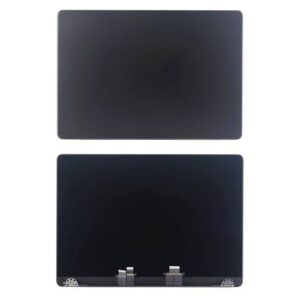
At Erepair N Spares, we provide OEM-quality MacBook Pro A2141 LCD screen replacements for customers throughout Auckland. Every replacement display is carefully selected, professionally tested, and installed by experienced technicians who understand Apple devices inside and out.
From the moment your MacBook arrives at our workshop, we focus on one thing—getting your device working properly again with quality parts and workmanship you can rely on.
Why Replace Your Screen?
A damaged display affects much more than appearance. It can reduce productivity, strain your eyes, and make your MacBook difficult—or even impossible—to use.
Replacing the LCD assembly can restore:
- Crystal-clear Retina visuals
- Accurate colours and brightness
- Smooth everyday performance
- Comfortable viewing experience
- Professional appearance
If the rest of your MacBook is functioning well, replacing the screen is often a practical and cost-effective solution.
Product Highlights
- OEM-Quality LCD Display Assembly
- Designed for MacBook Pro A2141
- Retina Display Clarity
- Excellent Colour Reproduction
- Factory-Level Fit
- Professionally Tested
- Installation Service Available
- 4-Month Repair Warranty
- Final Quality Inspection Included
Is Your MacBook Showing These Symptoms?
Your display may need replacing if you notice:
- Cracked or shattered screen
- Black display with power still on
- Flickering image
- Pink, green, or coloured lines
- Dead or bright pixels
- Screen bleeding
- Backlight problems
- White screen
- Liquid damage
- Pressure marks
- Display only works at certain angles
- Physical impact damage
If you’re experiencing any of these issues, our technicians can inspect the device and confirm whether the LCD assembly requires replacement.
Compatible Device
This LCD assembly is suitable for:
Apple MacBook Pro A2141 (16-inch)
Not sure about your MacBook model?
Bring your device into our workshop or contact us—we’ll help identify the correct replacement before ordering.
Why Auckland Customers Choose Erepair N Spares
We know that replacing a MacBook screen is an investment, which is why every repair is completed with attention to detail.
Before replacing the display, we inspect the MacBook for hidden damage that could affect performance. Once installed, the new screen is tested under multiple conditions to ensure brightness, clarity, colour accuracy, and overall functionality meet our quality standards.
Our technicians don’t rush repairs. Every MacBook is treated with the same care we’d expect for our own devices.
Every Repair Includes
- OEM-Quality LCD Assembly
- Professional Installation (Optional)
- Complete Device Inspection
- Display Calibration & Testing
- Camera & Sensor Testing
- Functional Quality Check
- Device Cleaning
- 4-Month Warranty
Our Screen Replacement Process
Device Assessment
Your MacBook is inspected to determine whether the LCD assembly is the source of the problem or if additional repairs are required.
Professional Installation
The damaged display assembly is removed using specialist tools, and the new OEM-quality LCD is installed with precision.
Performance Testing
Before returning your MacBook, we test:
- Display Resolution
- Brightness
- Colour Accuracy
- FaceTime Camera
- Ambient Light Sensor
- Opening & Closing Mechanism
- Overall Device Performance
Ready to Go
Once all tests are complete, your MacBook is ready for collection.
Local MacBook Repair Experts
Our workshop in Papakura regularly repairs MacBooks for customers from:
- Papakura
- Takanini
- Drury
- Karaka
- Manurewa
- Manukau
- Pukekohe
- South Auckland
Frequently Asked Questions
Q. Is this an original Apple screen?
This is an OEM-quality replacement display that has been professionally tested for brightness, colour accuracy, and overall performance before installation.
Q. How quickly can my MacBook be repaired?
Most screen replacements are completed within the same day or the following business day, depending on parts availability and workshop bookings.
Q. Does the warranty cover the repair?
Yes. Every MacBook Pro A2141 LCD replacement includes a 4-month warranty covering both the replacement display and our workmanship.
Q. Can I buy the LCD without fitting?
Absolutely. If you only require the replacement LCD assembly, we can supply the part separately.
Q. Will replacing the screen erase my data?
No. A display replacement does not normally affect your files. However, we always recommend creating a backup before any hardware repair.
Q. My MacBook only shows lines—is the screen definitely faulty?
Not always. Other hardware faults can sometimes cause display lines. That’s why we inspect every device before recommending a repair.
Q. How do I know my MacBook is model A2141?
The model number can usually be found on the underside of your MacBook. If you’re unsure, contact us with your serial number, and we’ll identify the correct model for you.
Reviews
There are no reviews yet.